VLANs and port profiles
Separate networks by use, with profiles for workstations, guests, servers and connected devices. Communication permissions are part of the overall network design.

UniFi Switching · Cyberprotech
From workstations to servers, WiFi, cameras and door access: we design and configure a network with capacity for today’s operations and tomorrow’s growth.
Switches distribute connections within your infrastructure. We plan ports, speeds, power and segmentation to connect devices and support daily management in UniFi Network.
Separate networks by use, with profiles for workstations, guests, servers and connected devices. Communication permissions are part of the overall network design.
Data and power over one cable for compatible devices. We size per-port power and the total budget for access points, cameras, phones and door access.
Copper and fibre connections selected for device requirements. We assess uplinks, distances, transceivers and capacity between racks.
Power and link redundancy, aggregation, MC-LAG or stacking where supported. We design and test the architecture against continuity requirements.
Visibility of topology, port status, PoE consumption and alerts. On Etherlighting models, visual port identification helps with on-site work.
Layer 3 routing and Pro AV features on suitable models. We plan multicast, timing and audio/video traffic around the solution’s requirements.
Features vary by model and software version. PoE, Layer 3, Etherlighting, MC-LAG, stacking and Pro AV are not available across the entire range.
Official UniFi information ↗FEATURE HIGHLIGHTS
UniFi Switching
On supported models, MC-LAG allows links to two switches to distribute traffic and reduce the impact of a failure.
UniFi Switching
Dedicated stacking ports on compatible Enterprise Campus switches connect devices in a jointly managed system. We size the topology and capacity.
UniFi Switching
Depending on the model, 10, 25 or 100 GbE links connect aggregation, servers and access layers. We validate modules, fiber and distances.
UniFi Switching
We size power delivery for access points, cameras and readers. Per-port power and the total budget must match the connected equipment.
UniFi Switching
On Etherlighting switches, colored ports help identify networks and link speeds, making organization and diagnostics easier.
UniFi Switching
We centralize VLAN, PoE and link aggregation configuration. Documented profiles simplify operations and future changes.
Features depend on model, firmware and configuration. We validate compatibility and test the intended behavior.
Demonstrations: Ubiquiti. View at Ubiquiti ↗
Features depend on model, firmware and configuration. We validate compatibility and test the intended behavior.
Demonstrations: Ubiquiti. View at Ubiquiti ↗
Features depend on model, firmware and configuration. We validate compatibility and test the intended behavior.
Demonstrations: Ubiquiti. View at Ubiquiti ↗
Features depend on model, firmware and configuration. We validate compatibility and test the intended behavior.
Demonstrations: Ubiquiti. View at Ubiquiti ↗
Features depend on model, firmware and configuration. We validate compatibility and test the intended behavior.
Demonstrations: Ubiquiti. View at Ubiquiti ↗
Features depend on model, firmware and configuration. We validate compatibility and test the intended behavior.
Demonstrations: Ubiquiti. View at Ubiquiti ↗
Explore European store families, from compact devices to campus and aggregation switches. Installation accessories and variants are included and identified on their cards.

For networks with higher-performance devices. We size ports, uplinks and power around connected equipment.

For networks with higher-performance devices. We size ports, uplinks and power around connected equipment.

For networks with higher-performance devices. We size ports, uplinks and power around connected equipment.

For networks with higher-performance devices. We size ports, uplinks and power around connected equipment.

For networks with higher-performance devices. We size ports, uplinks and power around connected equipment.

For demanding infrastructure, with capacity and service continuity designed for the project.

For demanding infrastructure, with capacity and service continuity designed for the project.

For network distribution in racks or near devices, with central configuration and ongoing management.

For network distribution in racks or near devices, with central configuration and ongoing management.

For demanding infrastructure, with capacity and service continuity designed for the project.

For demanding infrastructure, with capacity and service continuity designed for the project.

For demanding infrastructure, with capacity and service continuity designed for the project.

For demanding infrastructure, with capacity and service continuity designed for the project.

For access connections in offices and facilities, with organised ports and segmentation by use.

For access connections in offices and facilities, with organised ports and segmentation by use.

For access connections in offices and facilities, with organised ports and segmentation by use.

For networks with higher-performance devices. We size ports, uplinks and power around connected equipment.

For demanding infrastructure, with capacity and service continuity designed for the project.

For networks with higher-performance devices. We size ports, uplinks and power around connected equipment.

For demanding infrastructure, with capacity and service continuity designed for the project.

For links between switches, servers and racks. We assess uplink capacity and suitable fibre modules.

For links between switches, servers and racks. We assess uplink capacity and suitable fibre modules.

For WAN designs with high-availability gateways. We validate topology and compatibility before deployment.

For WAN designs with high-availability gateways. We validate topology and compatibility before deployment.

For networks with higher-performance devices. We size ports, uplinks and power around connected equipment.

For network expansion near devices and in spaces with specific mounting and power requirements.

For network expansion near devices and in spaces with specific mounting and power requirements.

For networks with higher-performance devices. We size ports, uplinks and power around connected equipment.

For network expansion near devices and in spaces with specific mounting and power requirements.

For network expansion near devices and in spaces with specific mounting and power requirements.

For network expansion near devices and in spaces with specific mounting and power requirements.

For network expansion near devices and in spaces with specific mounting and power requirements.

For network expansion near devices and in spaces with specific mounting and power requirements.

For network expansion near devices and in spaces with specific mounting and power requirements.
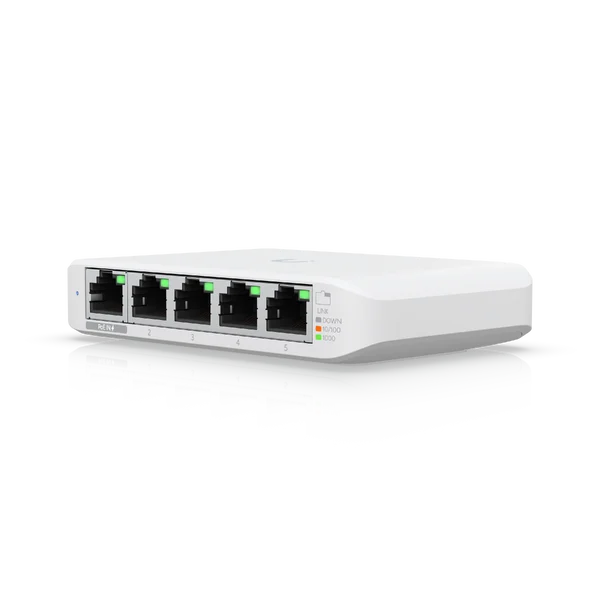
For network expansion near devices and in spaces with specific mounting and power requirements.

For network expansion near devices and in spaces with specific mounting and power requirements.

Protective enclosure for outdoor installation. This is an accessory: check compatible devices and power options.

Protective enclosure for outdoor installation. This is an accessory: check compatible devices and power options.

For network expansion near devices and in spaces with specific mounting and power requirements.

For networks with higher-performance devices. We size ports, uplinks and power around connected equipment.

For networks with higher-performance devices. We size ports, uplinks and power around connected equipment.

For networks with higher-performance devices. We size ports, uplinks and power around connected equipment.

For networks with higher-performance devices. We size ports, uplinks and power around connected equipment.

For network distribution in racks or near devices, with central configuration and ongoing management.

For network distribution in racks or near devices, with central configuration and ongoing management.

For access connections in offices and facilities, with organised ports and segmentation by use.

For access connections in offices and facilities, with organised ports and segmentation by use.

For network distribution in racks or near devices, with central configuration and ongoing management.

For links between switches, servers and racks. We assess uplink capacity and suitable fibre modules.

For demanding infrastructure, with capacity and service continuity designed for the project.

For demanding infrastructure, with capacity and service continuity designed for the project.

For network expansion near devices and in spaces with specific mounting and power requirements.

For network expansion near devices and in spaces with specific mounting and power requirements.

For network expansion near devices and in spaces with specific mounting and power requirements.

Compact switch family with different power supply options. We select the variant around the required PoE budget.
Selection depends on port count and speed, PoE budget, cabling, fibre, noise, ventilation, mounting, redundancy and expected growth. We confirm compatibility and availability in Portugal before proposing equipment.
Review ports, devices, racks, cabling and connections between spaces. Define capacity, PoE power and segmentation with room for growth.
Mount, organise and label connections. Configure VLANs, port profiles and uplinks, then test connectivity, power delivery and performance.
Management or co-management with your team, port and alert monitoring, updates and technical assistance. Support hours and response times are agreed in the service.
Maintain an inventory, port map and documented configurations. Transfer knowledge to the team and review capacity as spaces and devices change.
No. Models are available with and without PoE, and ports on a PoE model may have different capabilities. We check each device’s required standard, per-port power and total available budget.
We can integrate an existing installation after assessing compatibility, condition and performance. Target speeds, distances and PoE requirements may require changes to some connections.
It depends on device traffic and links between switches. Access points, servers and storage may justify more capacity. Fibre also supports longer distances between racks than suitable copper links for the project.
Not by itself. Inter-VLAN routing and switch rules must align with the firewall and security policies. We assess where each type of traffic should travel and be inspected.
Yes. We start by reviewing the network, administrative access, configurations and versions. We agree responsibilities, monitoring, updates and support with your team.
Yes. We plan migration by rack, area or service, with maintenance windows, tests and a rollback plan. Some changes require downtime, which is identified and agreed beforehand.
Stacking combines compatible ECS-S switches into one managed device, using dedicated links in a ring. It simplifies administration and supports resilient connections across switches. Model combinations, stack size and software requirements must be checked for the planned deployment.
MC-LAG distributes an aggregated connection across two compatible switches, adding link redundancy and load sharing. Stacking unifies multiple switches for management. Both require an appropriate topology and compatible equipment; we validate upstream and downstream connections and test failure scenarios.
Where supported, connectivity safeguards can roll back changes that make a device unreachable. Automatic recovery and staged PoE port startup can also help restore operation. We assess each function against device and software compatibility, backups and maintenance windows, and validate the settings through tests and monitoring.
Tell us how many locations, users and devices you need to connect. We help size, implement and support the solution.
Product images and video: Ubiquiti / UniFi. Content and service context: Cyberprotech.